Inside Kueue: How Kubernetes Decides What Runs Next
See how Kueue brings order to overloaded Kubernetes clusters by intelligently managing batch workloads with a hands on demo.


On this page (24)
- How Scheduling actually works on Kubernetes
- Kubernetes default scheduler works like this:
- The Relatable Problem
- Batch Jobs, Gang Scheduling, and Deadlock
- Traditional Microservices vs Batch Workloads
- Microservices (what your cluster probably handles now):
- Batch Workloads (what breaks your cluster):
- Real examples of Batch Workloads
- Why Jobs Need to Run Simultaneously (The Gang Scheduling Story)
- Why ALL Pods Must Start Together
- Why Batch Jobs Are Hard on Kubernetes, understanding Deadlock Scenario
- Meet Kueue: Your Cluster's Traffic Controller
- With Kueue :
- Why You Actually Need Kueue
- Understanding Objects in Kueue
- How these objects Work Together
- Installation of Kueue
- Demo: How Scheduling actually works in Kueue
- Setup: Create the Namespace
- The Real Deadlock Demo (Gang Scheduling)
- Let's create a Deadlock scenario first:
- Now let's use Kueue to solve this problem
- Wrapping up
- Resources
Your Kubernetes cluster works great for microservices until someone deploys a batch job that eats every GPU and CPU on the machine. Suddenly critical workloads starve, distributed jobs deadlock halfway through, and the scheduler has no idea what should run first. Kueue fixes this. It's a smart traffic controller that queues batch workloads fairly, prevents deadlock, and guarantees resources before a job ever touches your cluster. In this blog, we'll see why Kubernetes' default scheduler breaks on batch jobs, and then build Kueue from scratch with working demos you can run today.
How Scheduling actually works on Kubernetes #
Kubernetes default scheduler works like this: #
Pod lands → Scheduler checks if it fits on any node.

Resources available? → Yes → Pod gets scheduled

Resources available? → No → Pod sits in 'Pending' state until resources free up.Meanwhile, other important jobs also queue up and fight for the same resources.
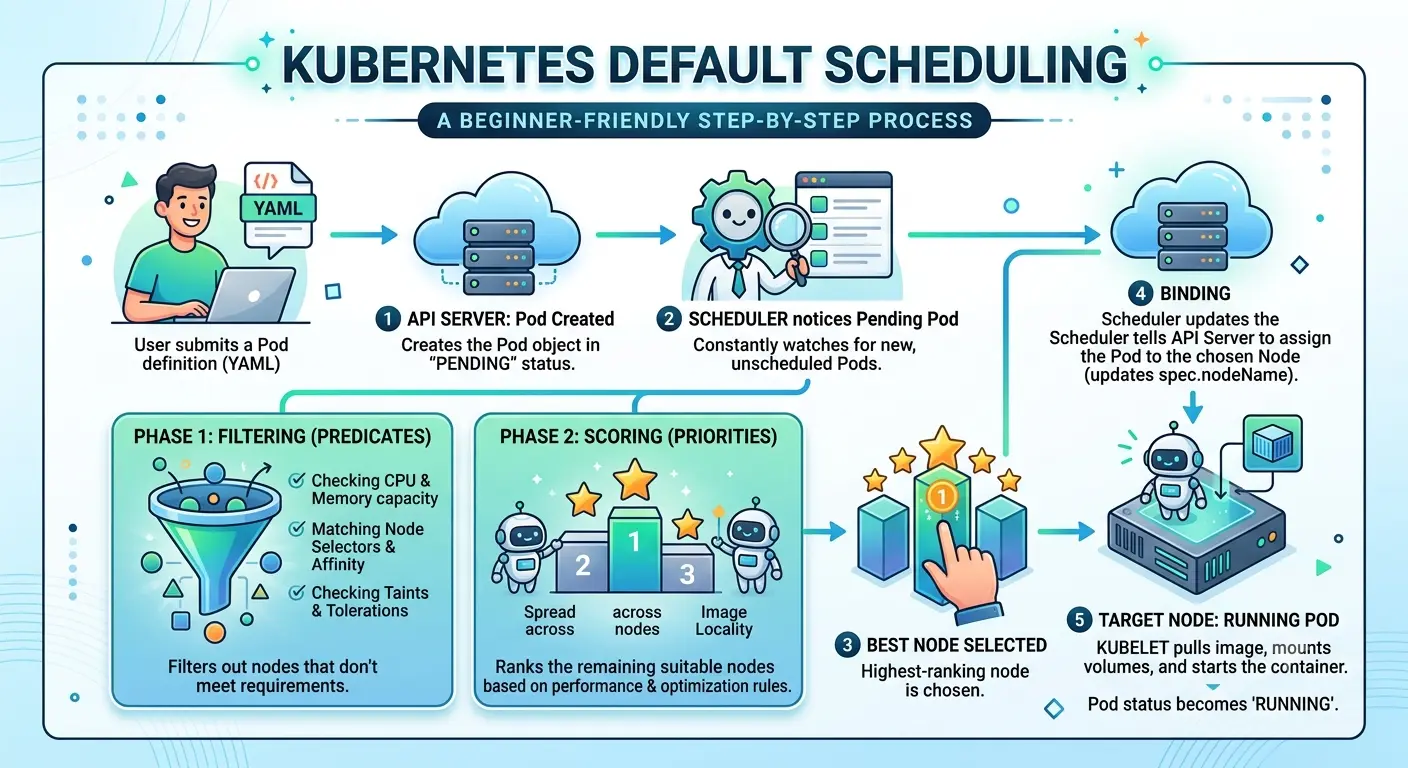
The key issues which one can face using default K8s scheduler:
- Job fairness across teams
- Deadlock issue (Some jobs require all pods to sync for run)
- Queue management (who should go first?)
- Resource quotas (how much can each team use?)
- Preemption (can I pause a low-priority job to run a critical one?)
The Relatable Problem #
Let us suppose that your team is running Kubernetes, and everything is working well. Microservices deploy smoothly. Then one day, someone deploys a Batch Job, maybe it's a machine learning model training job or a big data processing pipeline.
The job starts and immediately grabs every available GPU, CPU, and memory on the cluster. Meanwhile, other important workloads are left waiting for resources that won't become available anytime soon. In some cases, this can even create a deadlock: workloads are waiting on resources held by other workloads, while the cluster has no effective way to decide what should run first.
Sound familiar? This is the issue that Kueue is built to solve.
Batch Jobs, Gang Scheduling, and Deadlock #
Let's start with the basics, because not everyone has run batch jobs before.
Traditional Microservices vs Batch Workloads #
Microservices (what your cluster probably handles now): #
- Run 24/7 (or close to it)
- Need modest, predictable resources
- React to incoming requests Example: A web API serving user requests
Batch Workloads (what breaks your cluster): #
- Stateful (distributed state across pods)
- All or nothing (5 of 8 pods running = job hangs)
- Long running (hours, days, weeks)
- Coordinated (all pods must sync regularly)
- Resource intensive (GPUs, TPUs, high CPU)
- Run for a fixed time, then stop
- Don't react to requests; just 'process all this data' Example: Training an ML model on 1TB of data, processing tonight's logs, running backups
Real examples of Batch Workloads #
- Machine Learning Training - Needs: 8 GPUs, 256GB RAM for 4 hours
- Then: Stops completely
- Data Pipeline - Needs: 64 CPUs, 512GB RAM to process logs
- Then: Stops, waits for tomorrow
- Big Data Job (Spark, Hadoop) - Needs: 100 CPUs, 500GB RAM in one shot
- Then: Finishes
Why Jobs Need to Run Simultaneously (The Gang Scheduling Story) #
Imagine you're running a distributed machine learning job. Think of it like a team project where 4 people need to work together:
Job = 4 workers (4 separate pods)
Team Member 1: "I'm ready!"
Team Member 2: "I'm ready!"
Team Member 3: "I'm ready!"
Team Member 4: "Still waiting for a computer..."What happens?
Members 1-3 sit around wasting time.
The job doesn't progress.
Resources are used but no work gets done.
This is the gang scheduling problem.Why ALL Pods Must Start Together #
Distributed jobs have dependencies between their pods:
Pod 1 needs to talk to Pod 2
Pod 2 needs to receive from Pod 3
Pod 3 needs data from Pod 4

If Pod 4 is stuck in "Pending..."
→ Pod 3 can't send data
→ Pod 2 can't receive from Pod 3
→ Pod 1 is blocked
→ All 4 pods run but do NOTHINGWithout gang scheduling:
Scheduler tries to place 4 pods
Puts Pod 1 ✅
Puts Pod 2 ✅
Puts Pod 3 ✅
Can't fit Pod 4 ❌Result: 3 pods running, 1 waiting
Status: 3 pods doing nothing (waiting for Pod 4)
Wasted resources: 75% of the job's allocation is wastedWith gang scheduling (Kueue): Job says: "I need 4 pods or nothing" Kueue checks: Can I fit all 4?
  Yes? Admit all 4, they start together ✅✅✅✅
No? Queue all 4, none start yet ⏳⏳⏳⏳Result: Either 100% of the job runs, or 0% Wasted resources: None (no idle pods) This is Gang Scheduling, and it's why distributed jobs absolutely need it.
Why Batch Jobs Are Hard on Kubernetes, understanding Deadlock Scenario #
Kubernetes scheduler doesn't understand gang scheduling:
It doesn't know: "These 8 pods are a team that needs resources together"
It treats each pod independently
So it partially schedules the job
Partially scheduled distributed job = **DEADLOCK**This is where Kueue comes in.
Meet Kueue: Your Cluster's Traffic Controller #
Kueue is a job queuing and quota management system for Kubernetes Batch Workloads. It's a smart traffic controller that:
- Collects all jobs in organized queues
- Checks available resources before admitting anything
- Allocates fairly based on priority and quotas
- Admits jobs atomically (all or nothing for distributed jobs)
With Kueue : #
User Job → KUEUE (Smart Gatekeeper) → Kubernetes Scheduler → Pods created → No deadlockKueue's Core principle is to only admit a job to the cluster when we're 100% sure we have enough resources for ALL its pods.
Why You Actually Need Kueue #
- Fairness: Teams don't starve each other
- Gang Scheduling: Distributed jobs run all together or queue together
- Priorities: Critical jobs can be prioritized over experimental ones
- Visibility: You see exactly why a job is queued and when it'll run
- Resource Quotas: Each team gets a guaranteed slice of the cluster
Understanding Objects in Kueue #
- Workload What it is: A wrapper around your Kubernetes Job that Kueue understands.
Plain English: When you submit a Job to Kueue, Kueue wraps it in a 'Workload' object that tracks its status in the queue.
- LocalQueue What it is: A queue for jobs in a specific namespace.
Plain English: Think of it as a 'job submission desk' in your namespace. When your team submits a job, it goes into this queue first.
- ClusterQueue What it is: A higher level queue that holds the actual resource budget.
Plain English: This is where the real resource management happens. It's the 'headquarters' that decides "OK, we have 100 CPUs available. Which job gets them? Jobs from all namespaces compete here based on priority and fairness."
- ResourceFlavor What it is: A label for a type of resource in your cluster.
Plain English: It's like saying "we have two types of computers: expensive GPUs and cheap CPUs. Let me label them differently."
- ResourceQuota What it is: How much of a resource a ClusterQueue can use.
Plain English: "This queue can use up to 100 CPUs, 500GB RAM, and 16 GPUs. Not more."
- Admission What it is: When Kueue says "yes, your job can now run."
Plain English: The job has been waiting in the queue. Kueue checked the available resources and decided "OK, go ahead and run."
How these objects Work Together #
Job → Workload → LocalQueue → ClusterQueue → Resources Available? → ADMITTED → Scheduler → Pods → Running → Complete → Resources Released → Next Job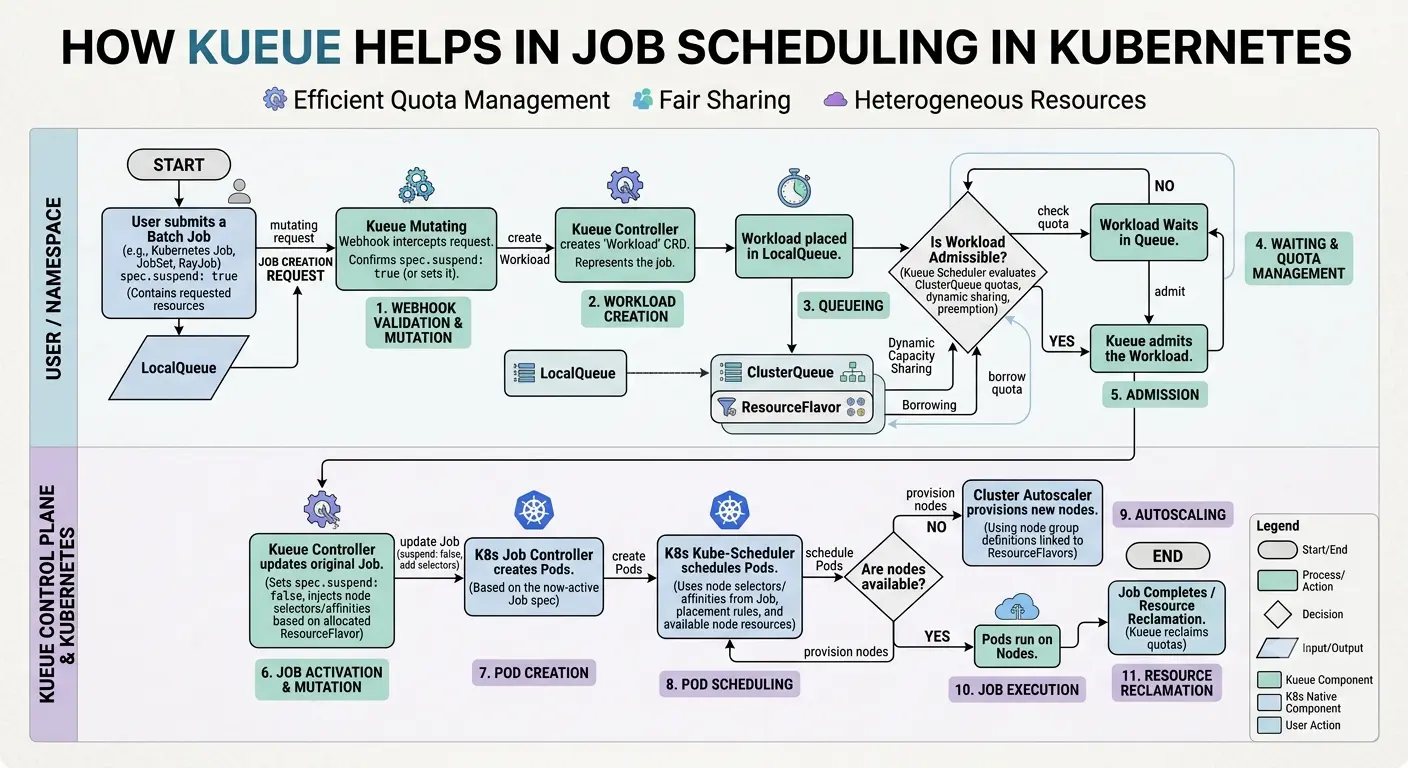
Installation of Kueue #
Kueue is just a Kubernetes controller.
Step 1: Install Kueue from Official Manifests
kubectl apply --server-side -f https://github.com/kubernetes-sigs/kueue/releases/download/v0.19.2/manifests.yamlThat's it. Kueue controller is now running.
Step 2: Verify Installation
kubectl get pods -n kueue-systemYou should see:
NAME                                        READY   STATUS    RESTARTS   AGE
kueue-controller-manager-69866f4b8d-4vf5x 1/1 Running 0 65sStep 3: Verify Custom Resources are Installed
kubectl get crds | grep kueueYou should see:
admissionchecks.kueue.x-k8s.io               2026-08-25T12:08:48Z
clusterqueues.kueue.x-k8s.io                 2026-08-25T12:08:48Z
cohorts.kueue.x-k8s.io                       2026-08-25T12:08:48Z
localqueues.kueue.x-k8s.io                   2026-08-25T12:08:48Z
multikueueclusters.kueue.x-k8s.io            2026-08-25T12:08:48Z
multikueueconfigs.kueue.x-k8s.io             2026-08-25T12:08:48Z
provisioningrequestconfigs.kueue.x-k8s.io    2026-08-25T12:08:48Z
resourceflavors.kueue.x-k8s.io               2026-08-25T12:08:49Z
topologies.kueue.x-k8s.io                    2026-08-25T12:08:49Z
workloadpriorityclasses.kueue.x-k8s.io       2026-08-25T12:08:49Z
workloads.kueue.x-k8s.io 2026-08-25T12:08:49ZDone! Kueue is ready.
Demo: How Scheduling actually works in Kueue #
Let's see Kueue in action with a simple scenario.
Setup: Create the Namespace #
kubectl create namespace kueue-demoStep 1: Create a ResourceFlavor
This tells Kueue about the resources available in your cluster:
apiVersion: kueue.x-k8s.io/v1beta2
kind: ResourceFlavor
metadata:
  name: default
spec: {}Save as resource-flavor.yaml and apply:
kubectl apply -f resource-flavor.yamlStep 2: Create a ClusterQueue
This is where we set resource limits:
apiVersion: kueue.x-k8s.io/v1beta2
kind: ClusterQueue
metadata:
  name: demo-queue
spec:
  namespaceSelector: {}
  resourceGroups:
    - coveredResources:
        - cpu
        - memory
      flavors:
        - name: default
          resources:
            - name: cpu
              nominalQuota: "10"        # Only 10 CPUs available
            - name: memory
nominalQuota: "20Gi" # Only 20GB RAM availableSave as cluster-queue.yaml and apply:
kubectl apply -f cluster-queue.yamlStep 3: Create a LocalQueue
This connects the namespace to the ClusterQueue:
apiVersion: kueue.x-k8s.io/v1beta2
kind: LocalQueue
metadata:
  name: default
  namespace: kueue-demo
spec:
clusterQueue: demo-queueSave as local-queue.yaml and apply:
kubectl apply -f local-queue.yamlStep 4: Create Job A (The Resource Hog)
This job will use 8 out of 10 CPUs:
apiVersion: batch/v1
kind: Job
metadata:
  name: job-a-big
  namespace: kueue-demo
  labels:
    kueue.x-k8s.io/queue-name: default
spec:
  completions: 1
  parallelism: 1
  template:
    spec:
      restartPolicy: Never
      containers:
      - name: container
        image: ubuntu:22.04
        command: ["sleep", "300"]
        resources:
          requests:
            cpu: "8"
            memory: "12Gi"
          limits:
            cpu: "8"
memory: "12Gi"Save as job-a.yaml and apply:
kubectl apply -f job-a.yamlStep 5: Watch What Happens
kubectl get workloads -n kueue-demo -wYou should see:
NAME                  QUEUE     RESERVED IN   ADMITTED   FINISHED   AGE
job-job-a-big-cb1a1 default demo-queue True 18salso check local queue, if the job is admitted or not
kubectl get localqueue -n kueue-demoshould show
NAME      CLUSTERQUEUE   PENDING WORKLOADS   ADMITTED WORKLOADS
default demo-queue 0 1Job A is ADMITTED because 8 CPUs fit within the 10 CPUs available.
Step 6: Create Job B (The Starved Job)
Now create another job that also needs resources:
apiVersion: batch/v1
kind: Job
metadata:
  name: job-b-small
  namespace: kueue-demo
  labels:
    kueue.x-k8s.io/queue-name: default
spec:
  completions: 1
  parallelism: 1
  template:
    spec:
      restartPolicy: Never
      containers:
      - name: container
        image: ubuntu:22.04
        command: ["sleep", "300"]
        resources:
          requests:
            cpu: "5"
            memory: "8Gi"
          limits:
            cpu: "5"
memory: "8Gi"Save as job-b.yaml and apply:
kubectl apply -f job-b.yaml -n kueue-demoStep 7: Watch the Queue
kubectl get workloads -n kueue-demoNow you see:
NAME                    QUEUE     RESERVED IN   ADMITTED   FINISHED   AGE
job-job-a-big-cb1a1     default   demo-queue    True                  4m40s
job-job-b-small-c8c54 default 47sJob A: ADMITTED (using 8 of 10 CPUs) Job B: NOT ADMITTED (only 2 CPUs available, but needs 5) Job B is stuck in the queue! It's waiting for resources.
Step 8: See Why Job B Is Waiting
kubectl describe workload job-job-b-small-c8c54 -n kueue-demoOutput:
Status:
  Conditions:
    Last Transition Time:  2026-08-25T12:30:48Z
    Message:               couldn't assign flavors to pod set main: insufficient unused quota for cpu in flavor default, 3 more needed
    Observed Generation:   1
    Reason:                Pending
    Status:                False
    Type:                  QuotaReserved
    Last Transition Time:  2026-08-25T12:30:48Z
    Message:               Not all pods are ready or succeeded
    Observed Generation:   1
    Reason:                WaitForStart
    Status:                False
    Type:                  PodsReady
  Resource Requests:
    Name:  main
    Resources:
      Cpu:     5
      Memory:  8Gi
Events:
  Type     Reason   Age    From             Message
  ----     ------   ----   ----             -------
Warning Pending 2m10s kueue-admission couldn't assign flavors to pod set main: insufficient unused quota for cpu in flavor default, 3 more neededStep 9: Free Up Resources (Delete Job A)
kubectl delete job job-a-big -n kueue-demoNow immediately check the workloads:
kubectl get workloads -n kueue-demooutput
NAME                    QUEUE     RESERVED IN   ADMITTED   FINISHED   AGE
job-job-b-small-c8c54 default demo-queue True 5m20sMagic! Job B is now ADMITTED. Kueue automatically moved it up the queue and gave it the freed resources.
What Just Happened:
Job A grabbed the big resources
Job B arrived but couldn't fit
Job A finished, releasing resources
Kueue saw the freed resources
Kueue admitted Job B
Job B ranThis is fair resource management. This is what Kueue does.
NOTE: LocalQueue named default adopts unlabeled jobs automatically.
The Real Deadlock Demo (Gang Scheduling) #
The Real Problem (Without Kueue)
ResourceQuota allows: 1500m CPU total

Job A arrives:
- Requests: 800m CPU
- Gets admitted, uses 800m
- Remaining: 700m CPU available

Job B arrives (GANG JOB - needs 2 pods):
- Each pod requests 400m CPU (800m total)
- Pod 1 is created, bringing the total request to 1200m
- Pod 2 would bring the total to 1600m, which exceeds the 1500m quota
- The ResourceQuota rejects Pod 2, so it is never created

Result:
- Job B has only one of its two pods
- Job B cannot make progress because its gang is incomplete
- Job A is holding 800m CPU
- The remaining 300m cannot satisfy another 400m pod
- Nothing can progress until Job A releases resources = DEADLOCKWhy is this Deadlock:
Job B CANNOT WORK with only one of its two 400m pods. It needs both pods.
- If it's a distributed ML job with 2 workers
- Worker 1 needs to sync with Worker 2
- Worker 1 starts with 400m CPU
- Worker 2 is never created because 1200m + 400m exceeds the 1500m quota
- Worker 1 sits idle waiting for Worker 2 = DEADLOCK

Meanwhile:
- Job A holds 800m CPU for 600 seconds
- Job B uses 400m CPU for 600 seconds
- Only 300m CPU is available, which is insufficient for another 400m pod
- System is stuckLet's create a Deadlock scenario first: #
The Setup
We have a cluster with limited resources. To simulate this, we'll use a ResourceQuota that caps our namespace at 1500m CPU (1.5 cores) and 2Gi memory.
Step 1: Let's clean up the Kueue demo so we start with a fresh cluster.
kubectl delete ns kueue-demo
kubectl delete clusterqueue demo-queueStep 2: Let's first create a Namespace
kubectl create namespace deadlock-demoStep 3: Let's create a ResourceQuota
apiVersion: v1
kind: ResourceQuota
metadata:
  name: cpu-limit
  namespace: deadlock-demo
spec:
  hard:
    requests.cpu: "1500m"
    requests.memory: "2Gi"
    limits.cpu: "1500m"
limits.memory: "2Gi"Apply it:
kubectl apply -f resource-quota.yamlThe Players
We'll run two jobs:
Job A: A long running job that takes 800m CPU (runs for 10 minutes)
Job B: A gang job needing 800m CPU total (2 pods × 400m each)Step 4: Create and Apply Job A (Takes 800m CPU)
apiVersion: batch/v1
kind: Job
metadata:
  name: job-a-takes-800m
  namespace: deadlock-demo
spec:
  completions: 1
  parallelism: 1
  template:
    spec:
      restartPolicy: Never
      containers:
      - name: cpu-hog
        image: busybox:latest
        command: ["sleep", "600"]
        resources:
          requests:
            cpu: "800m"
            memory: "1Gi"
          limits:
            cpu: "800m"
memory: "1Gi"Apply it:
kubectl apply -f job-a.yamlAlso check if it is working properly by using this command:
kubectl get pods -n deadlock-demoit should show something like this
(base) ekamwalia % kubectl get pods -n deadlock-demo

NAME                     READY   STATUS    RESTARTS   AGE
job-a-takes-800m-8jchw 1/1 Running 0 1m24s✅ Job A is happily running, consuming 800m CPU. We have 700m CPU left.
Step 5: Create Job B (Gang Job - 2 Pods × 400m Each = 800m Total)
Now comes the interesting part. Job B is a gang job it needs both pods running together to do any work. Think of it as a distributed computation where workers need to communicate:
apiVersion: batch/v1
kind: Job
metadata:
  name: job-b-gang
  namespace: deadlock-demo
spec:
  completions: 2
  parallelism: 2
  template:
    spec:
      restartPolicy: Never
      containers:
      - name: gang-worker
        image: busybox:latest
        command: ["sh", "-c", "echo 'Pod started. Waiting for partner pod...'; sleep 600"]
        resources:
          requests:
            cpu: "400m"
            memory: "512Mi"
          limits:
            cpu: "400m"
memory: "512Mi"Apply it:
kubectl apply -f job-b.yamlThe Deadlock Appears, lets investigate it:
First, lets check pods
kubectl get pods -n deadlock-demoyou should see something like
(base) ekamwalia % kubectl get pods -n deadlock-demo

NAME                     READY   STATUS    RESTARTS   AGE
job-a-takes-800m-8jchw   1/1     Running   0          4m36s
job-b-gang-mzb7c 1/1 Running 0 3m33s⚠️ Wait only ONE pod of Job B is running! The second pod is missing.
Second, lets describe upon Job B
(base) ekamwalia % kubectl describe job job-b-gang -n deadlock-demo

Name:             job-b-gang
Namespace:        deadlock-demo
Selector:         batch.kubernetes.io/controller-uid=240f3121-8b06-4b59-ac21-81667cc03f7e
Labels:           batch.kubernetes.io/controller-uid=240f3121-8b06-4b59-ac21-81667cc03f7e
                  batch.kubernetes.io/job-name=job-b-gang
                  controller-uid=240f3121-8b06-4b59-ac21-81667cc03f7e
                  job-name=job-b-gang
Annotations:      <none>
Parallelism:      2
Completions:      2
Completion Mode:  NonIndexed
Suspend:          false
Backoff Limit:    6
Start Time:       Thu, 03 Sep 2026 21:20:19 +0530
Pods Statuses:    1 Active (1 Ready) / 0 Succeeded / 0 Failed
Pod Template:
  Labels:  batch.kubernetes.io/controller-uid=240f3121-8b06-4b59-ac21-81667cc03f7e
           batch.kubernetes.io/job-name=job-b-gang
           controller-uid=240f3121-8b06-4b59-ac21-81667cc03f7e
           job-name=job-b-gang
  Containers:
   gang-worker:
    Image:      busybox:latest
    Port:       <none>
    Host Port:  <none>
    Command:
      sh
      -c
      echo 'Pod started. Waiting for partner pod...'; sleep 600
    Limits:
      cpu:     400m
      memory:  512Mi
    Requests:
      cpu:         400m
      memory:      512Mi
    Environment:   <none>
    Mounts:        <none>
  Volumes:         <none>
  Node-Selectors:  <none>
  Tolerations:     <none>
Events:
  Type     Reason            Age    From            Message
  ----     ------            ----   ----            -------
  Normal   SuccessfulCreate  3m39s  job-controller  Created pod: job-b-gang-mzb7c
  Warning  FailedCreate      3m39s  job-controller  Error creating: pods "job-b-gang-kbnll" is forbidden: exceeded quota: cpu-limit, requested: limits.cpu=400m,requests.cpu=400m, used: limits.cpu=1200m,requests.cpu=1200m, limited: limits.cpu=1500m,requests.cpu=1500m
  Warning  FailedCreate      3m38s  job-controller  Error creating: pods "job-b-gang-lvbbv" is forbidden: exceeded quota: cpu-limit, requested: limits.cpu=400m,requests.cpu=400m, used: limits.cpu=1200m,requests.cpu=1200m, limited: limits.cpu=1500m,requests.cpu=1500m
  Warning  FailedCreate      3m36s  job-controller  Error creating: pods "job-b-gang-bx9k2" is forbidden: exceeded quota: cpu-limit, requested: limits.cpu=400m,requests.cpu=400m, used: limits.cpu=1200m,requests.cpu=1200m, limited: limits.cpu=1500m,requests.cpu=1500m
  Warning  FailedCreate      3m35s  job-controller  Error creating: pods "job-b-gang-ccwgt" is forbidden: exceeded quota: cpu-limit, requested: limits.cpu=400m,requests.cpu=400m, used: limits.cpu=1200m,requests.cpu=1200m, limited: limits.cpu=1500m,requests.cpu=1500m
  Warning  FailedCreate      3m27s  job-controller  Error creating: pods "job-b-gang-k5cnf" is forbidden: exceeded quota: cpu-limit, requested: limits.cpu=400m,requests.cpu=400m, used: limits.cpu=1200m,requests.cpu=1200m, limited: limits.cpu=1500m,requests.cpu=1500m
  Warning  FailedCreate      3m11s  job-controller  Error creating: pods "job-b-gang-nxrdm" is forbidden: exceeded quota: cpu-limit, requested: limits.cpu=400m,requests.cpu=400m, used: limits.cpu=1200m,requests.cpu=1200m, limited: limits.cpu=1500m,requests.cpu=1500m
  Warning  FailedCreate      2m39s  job-controller  Error creating: pods "job-b-gang-hg6vq" is forbidden: exceeded quota: cpu-limit, requested: limits.cpu=400m,requests.cpu=400m, used: limits.cpu=1200m,requests.cpu=1200m, limited: limits.cpu=1500m,requests.cpu=1500m
  Warning  FailedCreate      99s    job-controller  Error creating: pods "job-b-gang-x72gx" is forbidden: exceeded quota: cpu-limit, requested: limits.cpu=400m,requests.cpu=400m, used: limits.cpu=1200m,requests.cpu=1200m, limited: limits.cpu=1500m,requests.cpu=1500m
Warning FailedCreate 39s job-controller Error creating: pods "job-b-gang-z5xbd" is forbidden: exceeded quota: cpu-limit, requested: limits.cpu=400m,requests.cpu=400m, used: limits.cpu=1200m,requests.cpu=1200m, limited: limits.cpu=1500m,requests.cpu=1500m🔴 This is the deadlock! The Job controller is desperately trying to create Pod 2, but it CANNOT, as we can see an error in our terminal
Warning FailedCreate 39s job-controller Error creating: pods "job-b-gang-z5xbd" is forbidden: exceeded quota: cpu-limit, requested: limits.cpu=400m,requests.cpu=400m, used: limits.cpu=1200m,requests.cpu=1200m, limited: limits.cpu=1500m,requests.cpu=1500mwhich means
Job B Pod 1 has: 400m CPU
Total used: 1200m CPU
Pod 2 needs: 400m more (would be 1600m, but limit is 1500m)Pod 1 is running but completely useless! It's just sitting there, holding 400m CPU hostage while waiting for its partner that will never come.
Now let's use Kueue to solve this problem #
Step 1: Create a separate Namespace named kueue-demo
kubectl create ns kueue-demoStep 2: Create Resource Flavor and Apply it
apiVersion: kueue.x-k8s.io/v1beta2
kind: ResourceFlavor
metadata:
name: default-flavorkubectl apply -f resourceflavor.yamlStep 3: Create ClusterQueue (Same 1500m CPU limit)
apiVersion: kueue.x-k8s.io/v1beta2
kind: ClusterQueue
metadata:
  name: smart-queue
spec:
  namespaceSelector: {}
  resourceGroups:
    - coveredResources:
        - cpu
        - memory
      flavors:
        - name: default-flavor
          resources:
            - name: cpu
              nominalQuota: "1500m"
            - name: memory
nominalQuota: "2Gi"kubectl apply -f cluster-queue.yamlStep 4: Create Namespace and LocalQueue
apiVersion: kueue.x-k8s.io/v1beta2
kind: LocalQueue
metadata:
  name: default
  namespace: kueue-demo
spec:
clusterQueue: smart-queuekubectl apply -f localqueue.yamlStep 5: Apply Job A (Same as before - Takes 800m CPU)
apiVersion: batch/v1
kind: Job
metadata:
  name: job-a-takes-800m
  namespace: kueue-demo
  labels:
    kueue.x-k8s.io/queue-name: default
spec:
  completions: 1
  parallelism: 1
  template:
    spec:
      restartPolicy: Never
      containers:
      - name: cpu-hog
        image: busybox:latest
        command: ["sleep", "600"]
        resources:
          requests:
            cpu: "800m"
            memory: "1Gi"
          limits:
            cpu: "800m"
memory: "1Gi"Apply it:
kubectl apply -f job-a.yamlAlso investigate Job A by:
kubectl get pods -n kueue-demo
kubectl get workloads -n kueue-demoIt should show something like
(base) ekamwalia % kubectl get pods -n kueue-demo
kubectl get workloads -n kueue-demo
NAME                     READY   STATUS    RESTARTS   AGE
job-a-takes-800m-jphv6   1/1     Running   0          10s
NAME                         QUEUE     RESERVED IN   ADMITTED   FINISHED   AGE
job-job-a-takes-800m-c8bc8   default   smart-queue   True                  10s
✅ Job A is admitted and running, just like before.
Step 6: Apply Job B WITH Gang Scheduling
apiVersion: batch/v1
kind: Job
metadata:
  name: job-b-gang
  namespace: kueue-demo
  labels:
    kueue.x-k8s.io/queue-name: default
spec:
  completions: 2
  parallelism: 2
  template:
    spec:
      restartPolicy: Never
      containers:
      - name: gang-worker
        image: busybox:latest
        command: ["sh", "-c", "echo 'Pod started. Waiting for partner pod...'; sleep 600"]
        resources:
          requests:
            cpu: "400m"
            memory: "512Mi"
          limits:
            cpu: "400m"
memory: "512Mi"Apply it:
kubectl apply -f job-b.yamlKueue Prevents the Deadlock
Now if we check the status of the workloads by
kubectl get workloads -n kueue-demowe should see something like
(base) ekamwalia % kubectl get workloads -n kueue-demo
NAME                         QUEUE     RESERVED IN   ADMITTED   FINISHED   AGE
job-job-a-takes-800m-c8bc8   default   smart-queue   True                  2m31s
job-job-b-gang-c597e default 76sNotice the empty "ADMITTED" column for Job B! Kueue has NOT admitted it because it knows there aren't enough resources for the ENTIRE job.
Also if we use describe command on Job B by
kubectl describe workloads job-b-gang -n kueue-demoWe should see something like this
(base) ekamwalia % kubectl describe job job-b-gang -n kueue-demo
Name:             job-b-gang
Namespace:        kueue-demo
Selector:         batch.kubernetes.io/controller-uid=ad359556-8a8f-4e45-9ac5-d67ded14fd35
Labels:           kueue.x-k8s.io/queue-name=default
Annotations:      <none>
Parallelism:      2
Completions:      2
Completion Mode:  NonIndexed
Suspend:          true
Backoff Limit:    6
Pods Statuses:    0 Active (0 Ready) / 0 Succeeded / 0 Failed
Pod Template:
  Labels:  batch.kubernetes.io/controller-uid=ad359556-8a8f-4e45-9ac5-d67ded14fd35
           batch.kubernetes.io/job-name=job-b-gang
           controller-uid=ad359556-8a8f-4e45-9ac5-d67ded14fd35
           job-name=job-b-gang
  Containers:
   gang-worker:
    Image:      busybox:latest
    Port:       <none>
    Host Port:  <none>
    Command:
      sh
      -c
      echo 'Pod started. Waiting for partner pod...'; sleep 600
    Limits:
      cpu:     400m
      memory:  512Mi
    Requests:
      cpu:         400m
      memory:      512Mi
    Environment:   <none>
    Mounts:        <none>
  Volumes:         <none>
  Node-Selectors:  <none>
  Tolerations:     <none>
Events:
  Type    Reason           Age    From                        Message
  ----    ------           ----   ----                        -------
  Normal  CreatedWorkload  2m48s  batch/job-kueue-controller  Created Workload: kueue-demo/job-job-b-gang-c597e
Normal Suspended 2m48s job-controller Job suspendedTHIS is the difference! Kueue automatically:
Intercepted the Job creation
Calculated total resource needs (2 × 400m = 800m)
Checked available resources (only 700m free)
Suspended the ENTIRE job no partial admission!Note the Suspend: true line: Kueue set that itself when it held the job back.
Wrapping up #
Kubernetes is great at running microservices, but batch jobs are a different beast. They're resource hungry, they need coordination, and they don't play nice with others.
Kueue fixes this.
In our demo, we saw the exact same job behave two completely different ways:
Without Kueue: One pod running uselessly, one pod stuck forever, 400m CPU wasted, and a deadlock that would last 10 minutes.
With Kueue: The entire job held back gracefully. Zero resources wasted. When resources freed up, both pods started together.
The magic? One label:
kueue.x-k8s.io/queue-name: default
That's it. No complex configs, no custom schedulers—just intelligent resource management that actually works.
The next time someone deploys a batch job that tries to eat your cluster, Kueue will be there to say: "Wait your turn."Resources #
- Official Kueue Docs
- GitHub
- Install:
kubectl apply --server-side -f https://github.com/kubernetes-sigs/kueue/releases/download/v0.19.2/manifests.yaml
I am an open source contributor and software engineer exploring the intersection of cloud infrastructure, distributed systems, and AI. I enjoy building scalable software, contributing upstream, and continuously learning new technologies.
Get new posts in your inbox.
Spotted a typo or want to improve this post? Edit on GitHub →